Asana is noisy.
This isn't.
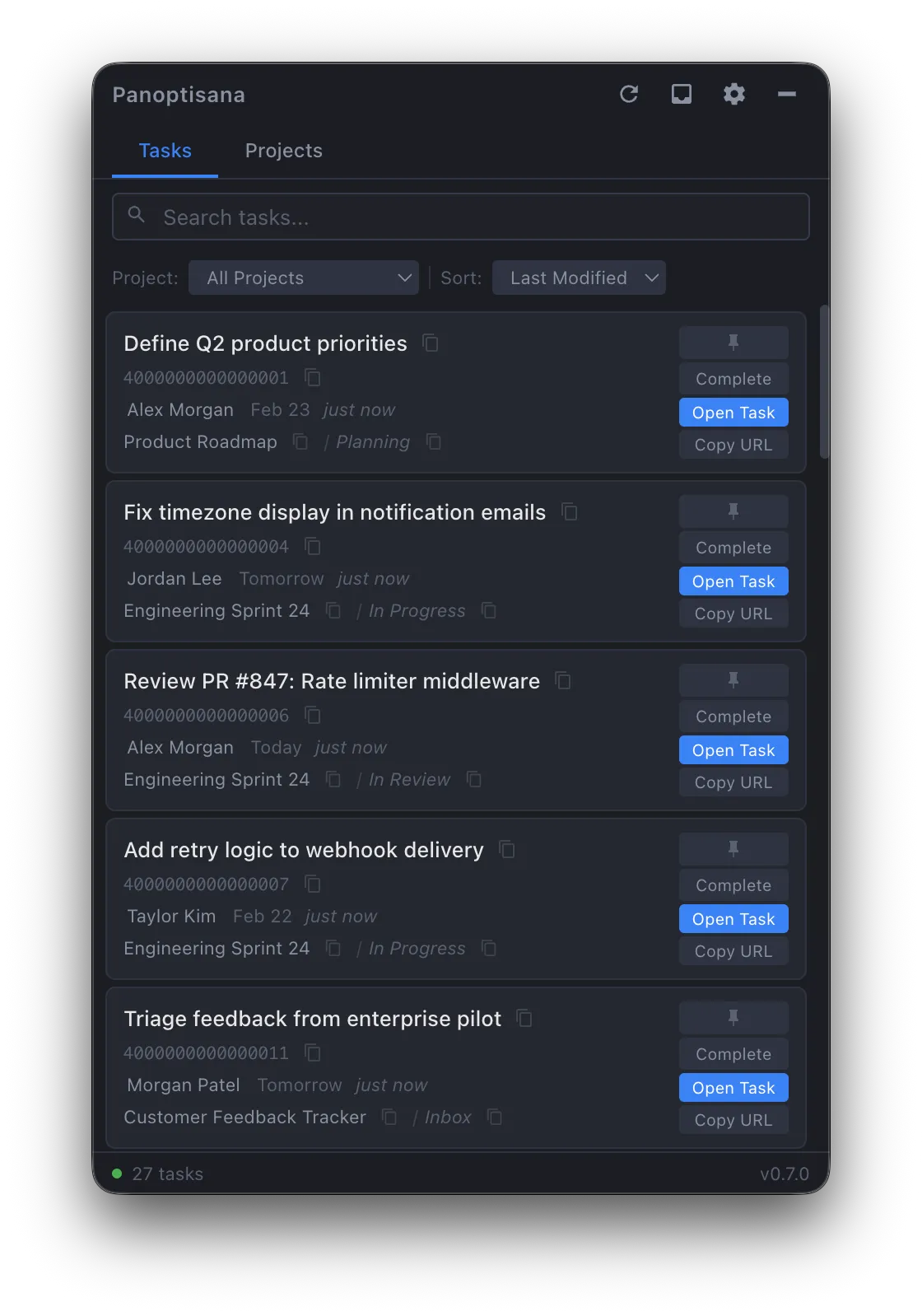
Panoptisana is a task-forward interface for Asana on macOS. Projects everywhere, tasks scattered across boards and lists, important things buried three clicks deep — Panoptisana cuts through all of that and puts your tasks, your projects, and your inbox in a single searchable window.
Menu bar app. Global hotkey. Appears when you need it, disappears when you don't.
The Problem
Asana is built for teams.
You just need your tasks.
In Asana's default interface, your work is scattered across projects, boards, timelines, and inboxes. Finding your own tasks means navigating a project management UI designed for planning sessions, not for the quick reference you need in the middle of actual work.
Panoptisana inverts the hierarchy. Tasks first, then projects, then everything else. A flat, searchable, filterable list with full detail panels — so you can find what you need, read the latest comments, check dependencies, and get back to work.
Features
Everything you need. Nothing you don't.
Task Detail Panel
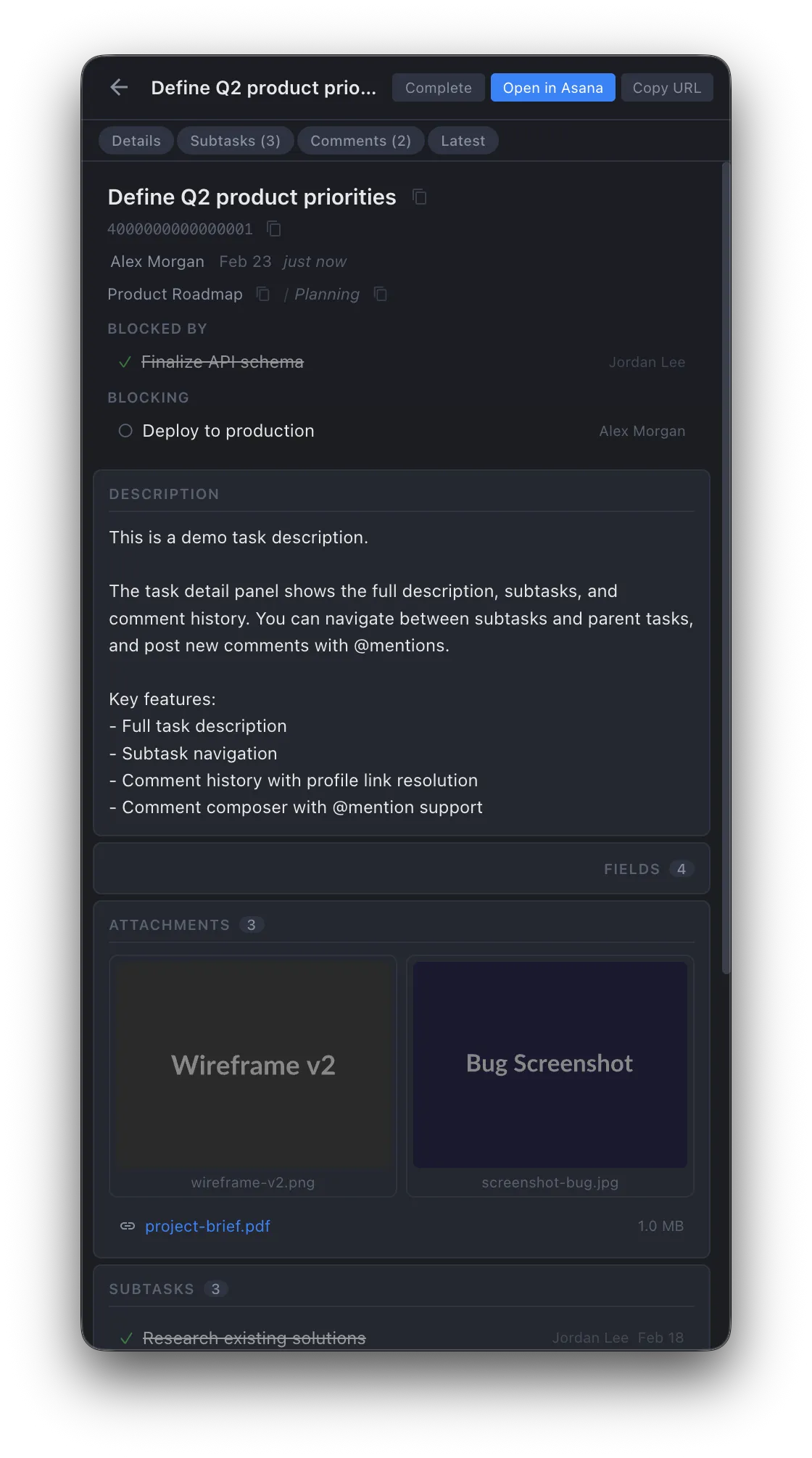
Full-width overlay with descriptions, subtasks, comments, attachments, dependencies, and project memberships. Drill into subtasks and navigate back. Post comments with @mention autocomplete — without opening a browser.
Inbox Notifications
Slide-out drawer with recent activity on your tasks — comments, assignments, status changes, reactions. Notification dot on the inbox button when something's changed. Click any notification to jump straight to the task detail.
Instant Search & Filtering
Type and the list narrows immediately. Filter by project, by team member, or by inclusion/exclusion patterns. Pin important tasks to the top. The status bar shows your filtered count so you always know the scope of what you're looking at.
Comments & @Mentions
Read and post comments directly in the app. @mention autocomplete resolves to real Asana profiles. Activity highlighting shows which tasks have new comments since you last looked. Clickable links and attachments inline.
One-Click Copy Everything
Task names, GIDs, URLs, assignees, project names, section names — all one click to copy. Built for the workflow where you're pasting Asana references into Slack, PRs, or documentation. This was the original reason I built it.
Global Hotkey
Configurable keyboard shortcut gives you instant access from anywhere. The window appears, you get what you need, and you're back to work. No Dock icon, no Cmd+Tab entry. Pure utility.
And Also
The details that add up.
Pin tasks and projects to the top of your list. Persists across sessions.
"Blocked by" and "Blocking" sections with clickable navigation into dependency chains.
Image grid with lazy-loaded thumbnails. File list with sizes. Right-click to open or copy link.
Drill into subtasks and parent tasks with a navigation stack. Back button to return.
Two-click completion with a confirmation step to prevent accidents.
Export filtered task and project lists with configurable fields. Good for reporting and audits.
Task Detail Panel
Project View
Projects get the same treatment.
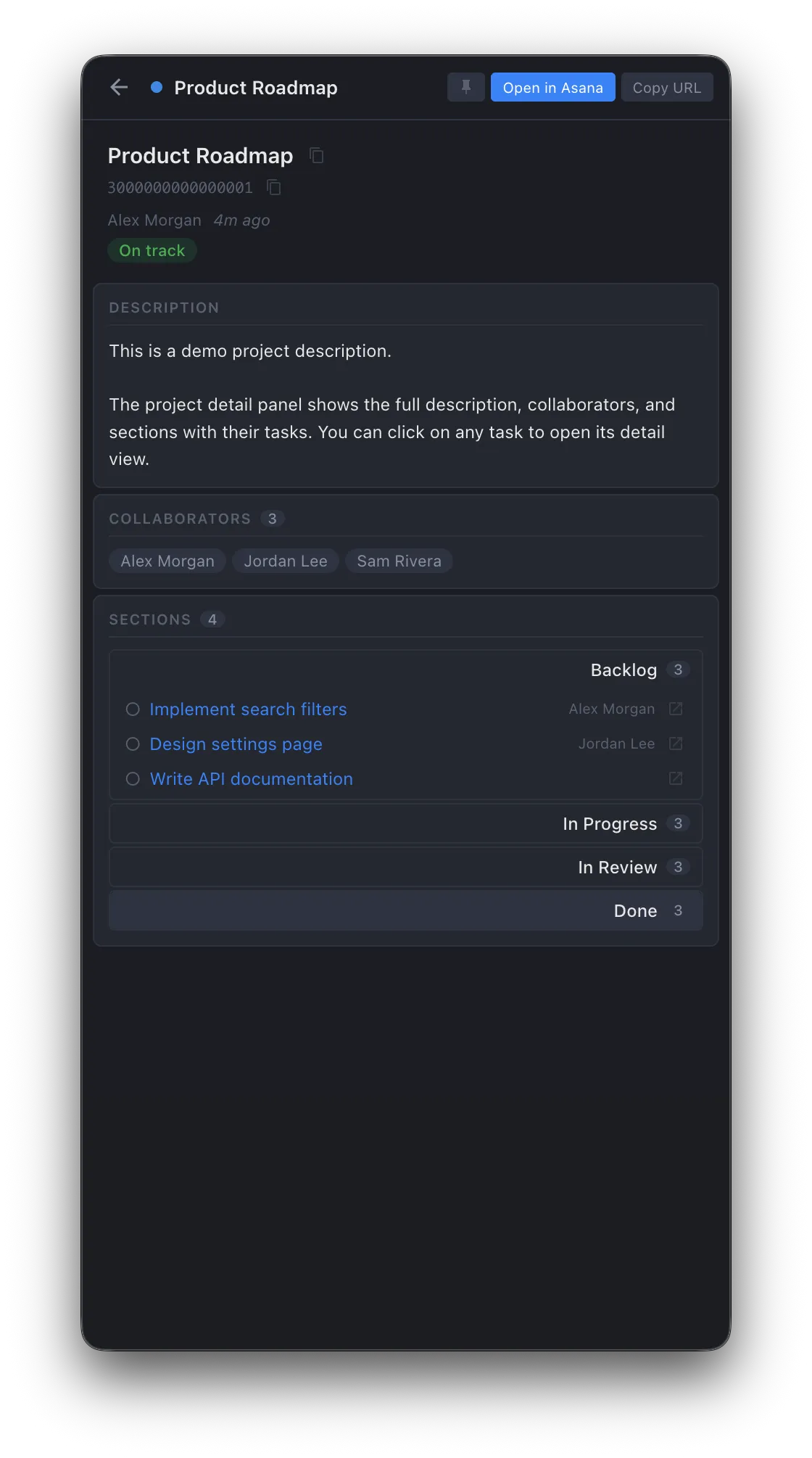
Searchable project list with the same compact, one-click-copy layout as tasks. Sections and custom field GIDs surfaced for automation workflows. "Only My Projects" filter cuts the noise. Everything opens in your browser of choice or the Asana desktop app.
Tabbed panel showing project sections and custom fields, each with one-click GID copy for your automations.
Full project detail panels with description, collaborators, and collapsible sections with lazy-loaded task lists. Click any task to drill into its detail panel.
Custom field names and values surfaced in the task detail panel — see priority, status, and other metadata your team has configured.
Export project data — sections and fields — for reporting, audits, or offline reference.
Under the Hood
Quiet, respectful, and out of the way.
Background polling
Auto-refreshes at your chosen interval. Polling indicator shows when a sync is happening. Data stays current without you thinking about it.
Keychain encryption
Your Asana API key is stored in the macOS keychain. Not in a config file, not in plaintext. Sandboxed windows, IPC-masked credentials.
Auto-updates
Updates from GitHub releases, downloaded and applied automatically. Always running the latest version without manual intervention.
System-following themes
Dark, light, or system. Seven accent colors. Configurable browser for Asana links — Safari, Chrome, Firefox, Arc, Zen, or the Asana desktop app.
Menu bar only
No Dock icon, no Cmd+Tab entry. Always-on-top when visible. Lives in the system tray like a utility should — present when you need it, invisible when you don't.
Open source (GPL-3.0)
Full source on GitHub. CI on every push (typecheck + lint + test). SQLite for local data persistence. Built with Electron, React, TypeScript, Vite.
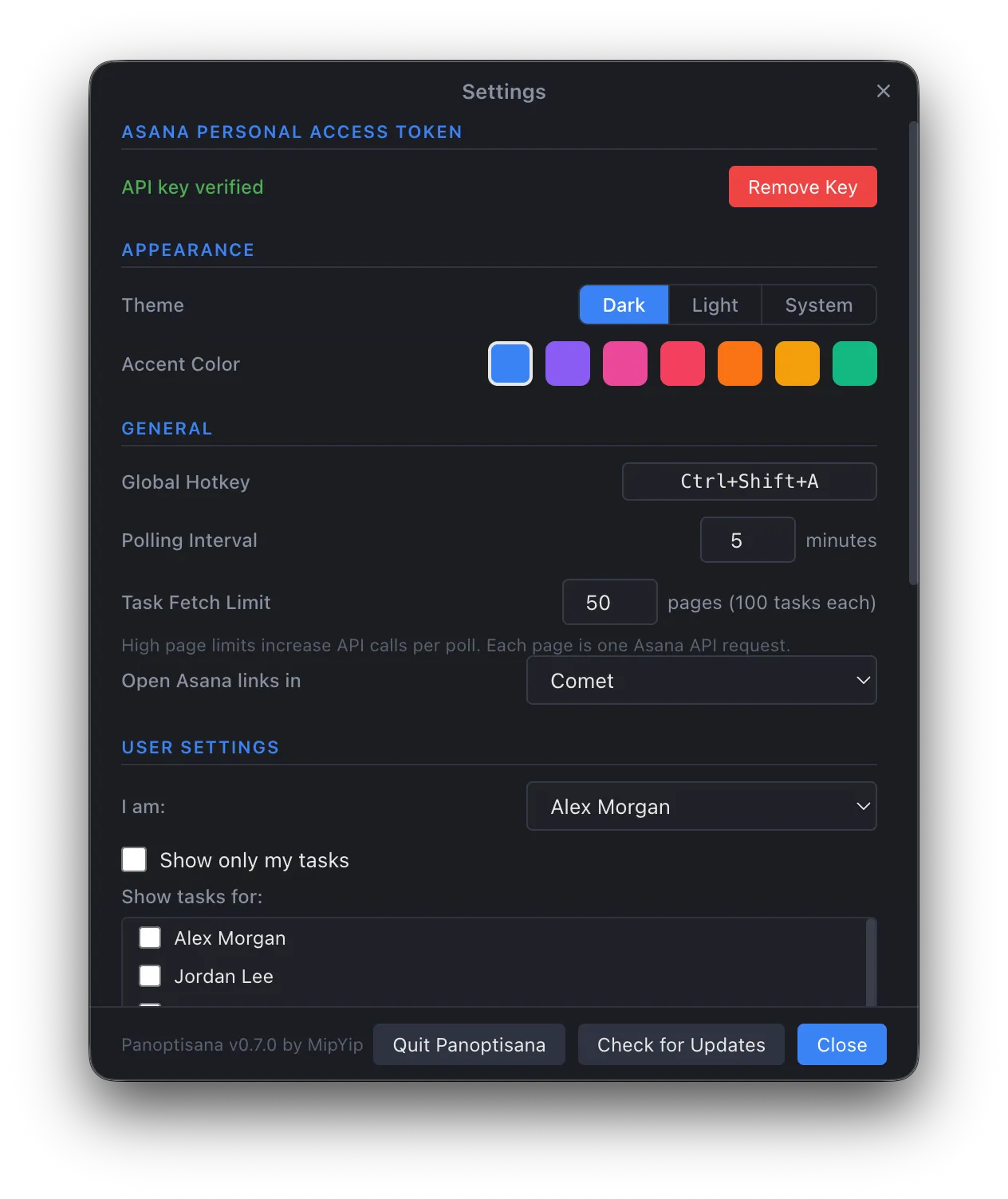
Themes, accent colors, hotkey, polling interval, multi-user filtering
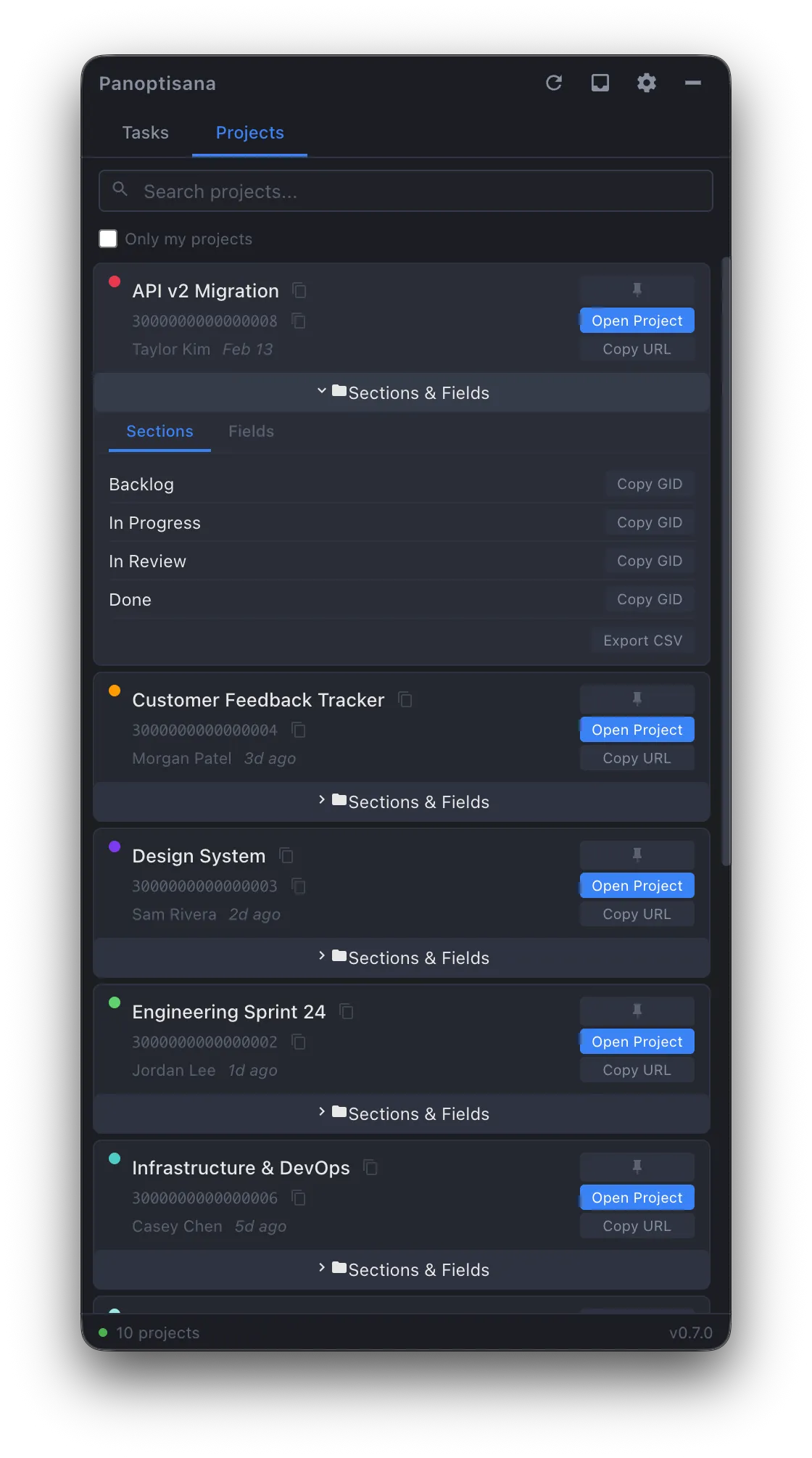
Project sections and fields with one-click GID copy and CSV export
Who It's For
People who use Asana but don't want to live in it.
Engineers, project managers, and team leads who need fast, task-forward access without navigating Asana's full project management interface. If you work across multiple projects and find yourself losing track of tasks, or if you just need to quickly grab a GID, check a comment, or see what's assigned to you — this is for you.
Particularly useful if you build automations that reference Asana objects. Every GID, section name, project ID, and field ID is one click to copy — that's why I originally built it.
Development Philosophy
Perpetual beta is the point, not a caveat.
I use Panoptisana every day. It's my primary interface to Asana — more than the actual Asana web app. It started because I needed GIDs for my automations and Asana makes those annoyingly hard to find. But I couldn't just leave a tool in a half-finished state, even if I was the only user.
So it grew. Task details, comments, inbox, attachments, dependencies — each feature appeared because I hit a workflow gap. The app has shipped dozens of features across many releases, and it keeps evolving with real usage rather than a speculative roadmap.
The entire app is AI-assisted — greater than 80% single-pass feature delivery across 20+ version bumps with a growing codebase. Not because the AI writes code unsupervised, but because the engineering constraints (strict TypeScript, CI gates, living roadmap, session context docs, exhaustive AI-run code review followed by human inspection after every major feature sprint) make single-pass delivery the norm rather than the exception.
Dogfooded daily
Every feature has been tested in a real workflow managing real projects. No theoretical features.
Driven by use, not speculation
Features appear when a workflow gap is encountered. The roadmap is usage, not imagination.
Stable by default
"Beta" means it evolves — not that it crashes. CI gates on every push (typecheck + lint + test). Features ship solid because they run against production Asana data daily.
Open to contribution
If you hit a workflow gap I haven't hit yet, the source is right there. Issues and PRs welcome.
Ready to try it?
Free, open source, no sign-up required.
Technical Stack
Support & Contributions
Found a bug? Have an idea? Want to contribute?
Panoptisana is open source and actively maintained. If something isn't working, or if you've hit a workflow gap I haven't hit yet, the best way to get it fixed is to open an issue.
Try it. It's free.
Open source, no sign-up, no tracking. Download the latest release, add your Asana Personal Access Token, and you're running.